The S3 client for Mac, iPhone and iPad
Your cloud files,
like folders on every device.
A fast, native app for Mac, iPhone and iPad, for Amazon S3 and your servers. Browse, download, upload and sync files of any size.
Download on the App StoreMac, iPhone and iPad · Free to download · 15-day free trial · then $9.99 once for all your devices, no subscription
- Amazon S3
- S3-compatible
- Azure Blob Storage
- OpenStack Swift
- SFTP
- WebDAV
- FTP
- FTPS
No file size limits
Any size, any time
Large files stream straight to disk and upload in parts. Interrupted transfers pick up where they stopped.
Checked downloads
Every download that can be checked is verified against its checksum, so you know the file arrived intact.
Keeps going
Your Mac stays awake during long transfers, and you get a notification when they finish.
On your Mac
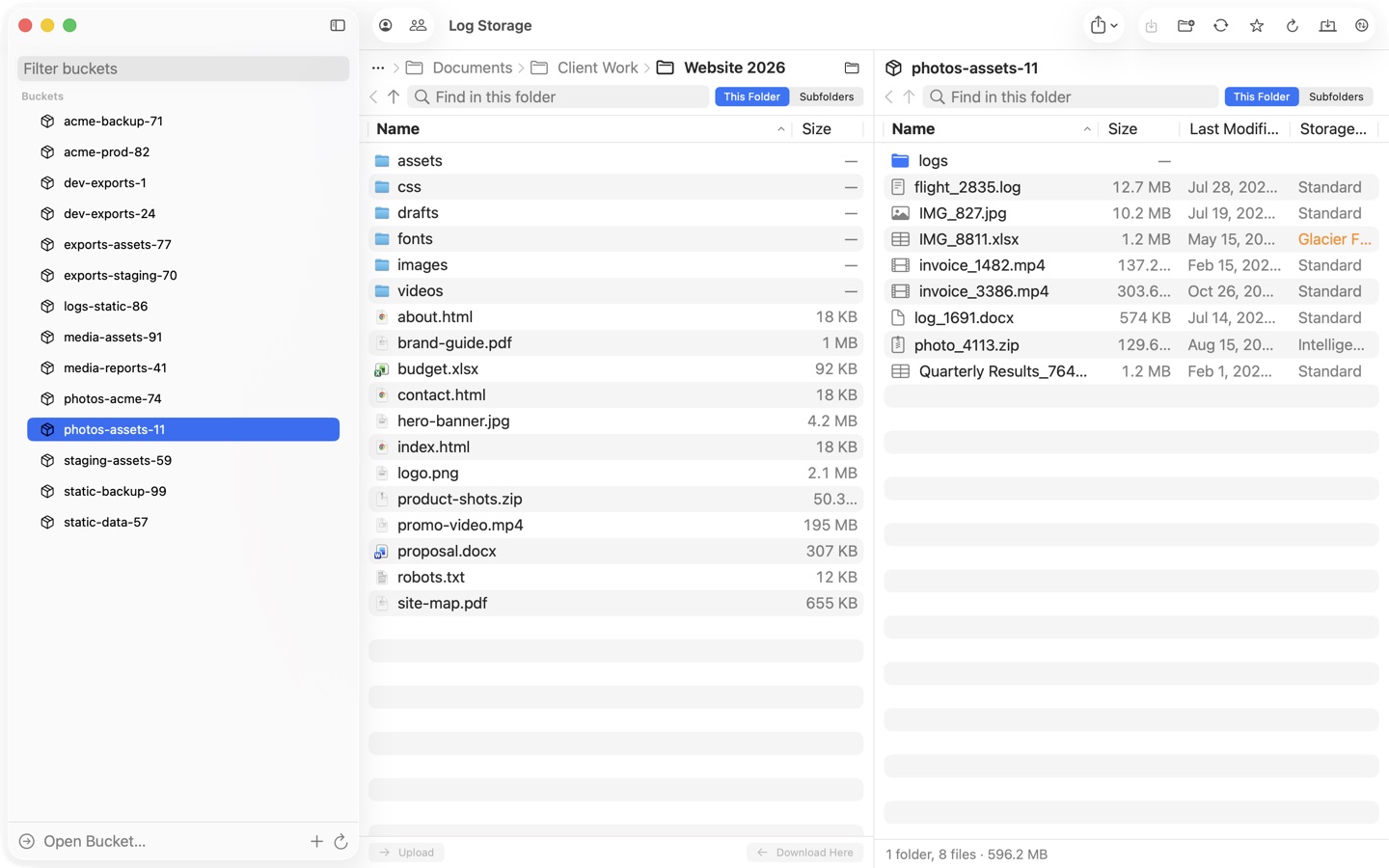
Two panes, side by side
Your Mac on one side, your server on the other, with the same path bar, columns and controls on both.
Find files
Find files by name in the current folder or in all its subfolders, on your Mac and on the server.
Go anywhere
Click any folder in the path, or jump to Home, Desktop, Documents, Downloads or any folder with Go to Folder (⇧⌘G).
Quick Look
Press the space bar to preview any file without downloading it first.
Edit in place
Open a file in your favorite app. Every save is uploaded automatically.
Folder sync
Sync a Mac folder with a server folder, and review every change before it runs.
Copy, paste, drag
Move files between folders and buckets, duplicate them, or drag them in from Finder.
Batch rename
Rename hundreds of files at once: replace text, add text, or number them.
Many accounts
Search and filter all your accounts, and switch between them with ⌘K.
On iPhone and iPad
Your servers in the Files app
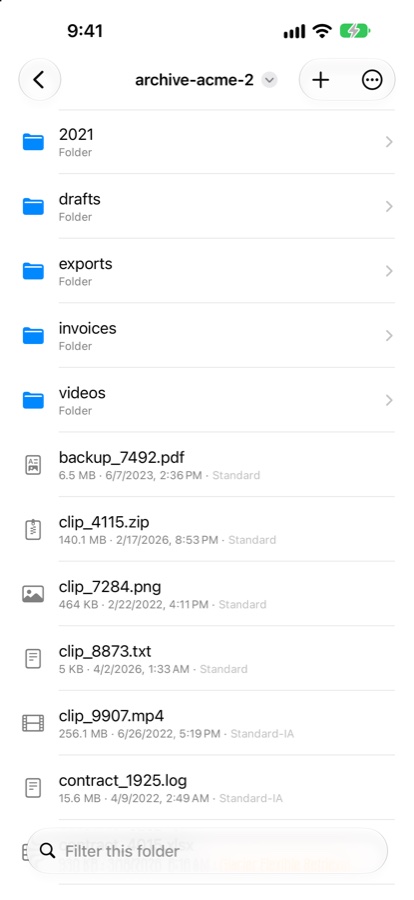
Each account can appear in the Files app: open, save and move files from any app, as if they were on your device.
Glacier, right in Files
Archived files are tagged with their storage class. Change the class or restore a file from the Files menu.
Transfers that keep going
Downloads and uploads continue in the background, with a transfer bar and a notification when they finish.
Photos and drag and drop
Upload straight from your photo library, or drag files in from other apps on iPad.
Same accounts everywhere
Your accounts sync between your Mac, iPhone and iPad through iCloud Keychain, end-to-end encrypted.
Buy once
One purchase unlocks Transfer Deck on your Mac, iPhone and iPad with the same Apple Account.
Built for Amazon S3, ready for your servers
S3 power tools
Version history, storage classes, Glacier restores, metadata, encryption, and expiring web links.
SFTP, old and new
Passwords or SSH keys (OpenSSH, PEM and PuTTY). Works with modern servers and much older ones.
WebDAV, FTP, FTPS
Plus any S3-compatible storage service through a custom endpoint.
Azure and Swift
Azure Blob Storage with a storage account key, and OpenStack Swift object storage.
Storage classes
Choose the class new uploads get, Glacier included, and change it for existing files.
AWS IAM Identity Center
Sign in with your organization's AWS access portal (SSO) instead of access keys. Pick the account and role; keys renew automatically.
Even more
Your accounts in Finder
Show an account in Finder's sidebar and work with its files like a disk.
Upload from any app
Share → Transfer Deck on Mac, iPhone and iPad, or Services → Upload with Transfer Deck in Finder.
Shortcuts and Siri
List, download the latest files, upload, move, delete and get web links in your shortcuts.
Cryptomator vaults New
Open and create Cryptomator vaults on any account, on your Mac or on your iPhone. Files are encrypted on your device before upload.
Face ID and Touch ID
Lock the app when you're away. Transfers keep running.
More storage services
Google Cloud Storage, Hetzner, OVHcloud, Exoscale, Vultr, Storj and Tigris, ready to pick.
Simple pricing
Browsing is always free. Try every feature for 15 days: nothing is charged and nothing renews.
One-time purchase. Yours forever. No subscription.
Private by design
Your keys and passwords stay in your Keychain (synced end-to-end encrypted by iCloud Keychain, if you keep that on) and are sent only to the server you connect to. Files go directly between your devices and your storage, never through us. No accounts, no analytics, no tracking. Read the privacy policy.